

Instagram Reels have become one of the most popular ways to share short, engaging videos with friends and followers. Many users want to save their favorite Reels, especially those with music, for offline viewing, reposting, or personal collections. However, downloading Reels with music can be tricky due to copyright restrictions and platform limitations. If you’re looking for a reliable way to learn how to download instagram reel with music, this article, videodownloadapp.us will guide you through the best tools and tips to make the process simple and safe.
Can I Download Instagram Videos with Music?
Yes, it is possible to download Instagram videos with music, but there are some limitations. Instagram itself does not allow direct downloads of Reels with copyrighted music to your device, so you cannot save them directly from the app. Copyright laws often prevent the music from being included when downloading through official means.
How to Download Instagram Reels with Music: 4 Tips
If you want to learn how to download instagram reel with music, there are reliable alternatives. You can use screen recording on your device to capture both video and sound, or turn to trusted third-party apps and online tools like ReelSave, SnapDownloader, or Clippy. These methods allow you to save your favorite Reels with music for offline viewing, sharing, or personal collection while respecting copyright guidelines.
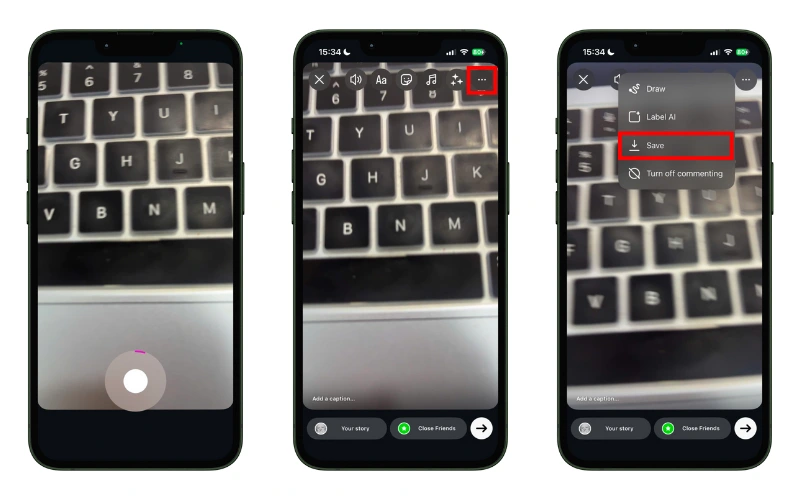
1. Instagram’s Native Save Feature
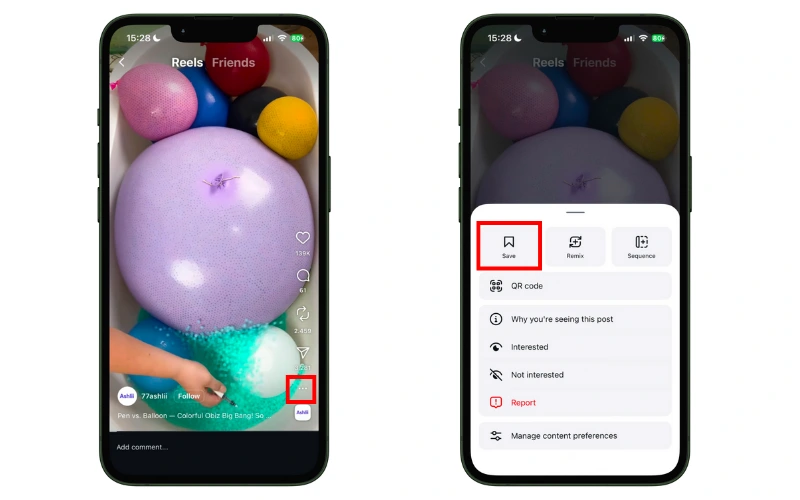
Instagram provides a built-in “Save” option that allows you to save Reels to your personal collection within the app. This is a quick and convenient way to bookmark your favorite videos without using any third-party tools.
Limitations & Notes:
- Saved Reels using this feature do not download to your phone’s gallery, so you can only view them inside Instagram.
- Music may not be included due to copyright restrictions, meaning you won’t have the full audio experience offline.
- This method is ideal if you just want to revisit Reels later within Instagram, but not for offline sharing.
If your goal is to how to download instagram reel with music to watch offline or share outside Instagram, you’ll need to use third-party apps or screen recording methods instead.
Readmore: TOP app download video Instagram iphone
2. Screen Recording Method (iPhone & Android)
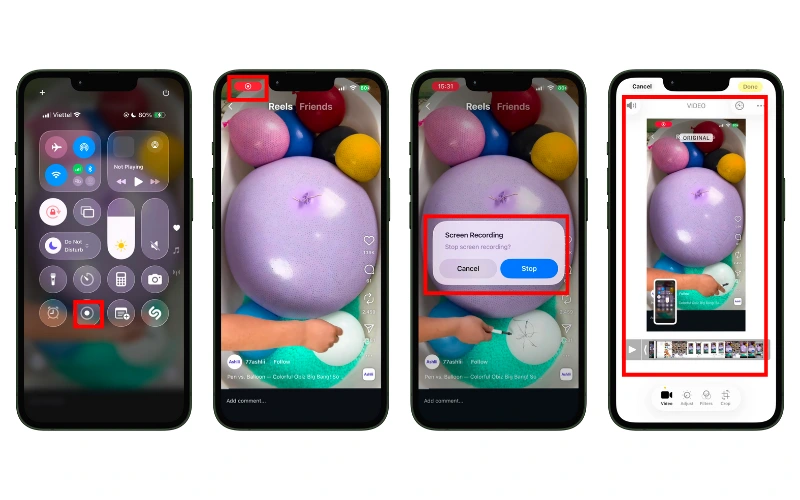
Using your device’s built-in screen recording feature is a simple way to capture Instagram Reels along with their music. Both iPhone and Android devices allow you to record your screen while playing the Reel.
Here is a basic step-by-step guide to download Instagram Reels to your phone with music.
- Step 1: Enable screen recording on your device and make sure system audio is turned on.
- Step 2: Open Instagram and play the Reel you want to save.
- Step 3: Start the screen recording and let it run until the Reel finishes.
- Step 4: Stop the recording; the video will be saved to your gallery or camera roll.
When using the screen recording method to save Instagram Reels with music on iPhone or Android, following these tips can help you get the best results:
- Record in a Quiet Environment: Make sure to minimize background noise to capture the Reel’s audio clearly.
- Use the Highest Screen Resolution: Set your device to its maximum display resolution to ensure the video looks sharp and detailed.
- Keep Your Device Stable: Hold your phone steadily or use a tripod to avoid shaky footage that can affect video quality.
By applying these tips, you can achieve a recording that is much closer in quality to the original Reel while learning how to download instagram reel with music effectively.
3. Using Third-Party Apps and Online Tools
Downloading Instagram Reels with music can be much easier with the help of trusted third-party apps and online tools. These solutions let you save Reels directly to your phone, keeping both the video and audio intact. If you’re wondering how to download instagram reel with music, these tools provide a convenient alternative to screen recording or Instagram’s native save feature.
Here are some recommended tools:
- Snapinsta: A web-based tool that allows you to quickly download Instagram Reels and Stories with music. Just copy the Reel’s link, paste it into Snapinsta, and select your preferred video quality.
- MultCloud: This cloud management platform supports downloading Reels directly to your device. It’s especially useful if you want to manage multiple downloads efficiently.
- Online Reels Downloader: A simple online tool where you paste the copied URL and get a high-quality download of your Reel with music included.
- Clippy (Android): A fast and reliable app that lets Android users download Instagram Reels without watermarks, preserving the original audio.
How to Use These Tools:
- Open Instagram and find the Reel you want to save.
- Tap the three-dot menu (⋮) and select Copy Link.
- Open the chosen app or website and paste the copied URL.
- Follow the tool’s instructions to download the video with music.
Security and Privacy Warnings:
- Only use trusted apps or websites to avoid malware or phishing risks.
- Avoid logging in with your Instagram credentials on unknown platforms.
- Respect copyright laws when downloading and sharing content.
4. Downloading or Extracting Reel Audio Only
Sometimes, you may want to save just the audio from an Instagram Reel rather than the full video. This is useful for creating your own content, using music for personal projects, or simply enjoying your favorite soundtrack offline. If you’re looking for ways to do this, here’s how you can learn how to download instagram reel with music specifically as audio.
One approach is using apps like InShot or Snaptube, which allow you to extract audio directly from Reels. Simply copy the Reel’s URL, open the app, and select the option to download or convert the video into an audio file, typically in MP3 format.
Alternatively, online tools and browser extensions provide a quick way to extract audio without installing any apps. Websites like ReelSave or dedicated Instagram audio downloaders let you paste the Reel link and get the audio file in just a few clicks.
Important Tips:
- Always use trusted apps or websites to avoid malware or unwanted software.
- Check copyright restrictions before using the audio for anything beyond personal listening.
- Some tools may allow you to choose audio quality, so select the highest quality available for the best listening experience.
Readmore: Funny questions for Instagram story
By following these methods, you can easily capture your favorite music and understand how to download instagram reel with music in audio format only, making it perfect for offline enjoyment or content creation.
In conclusion, there are multiple ways to save Instagram Reels with music, each with pros and cons. For the easiest and safest method, using trusted third-party apps or online tools is recommended. These solutions let you enjoy your favorite Reels offline and fully understand how to download instagram reel with music.
