

TikTok allows users to save videos they enjoy for later viewing, making it easy to revisit content without searching for it again. A common concern among users is privacy—does TikTok notify when you save someone’s video? Many wonder whether the original creator will be alerted when someone saves their content. This guide will clarify how TikTok handles video saves and what notifications, if any, are sent.
Does TikTok Notify When You Save Someone’s Video?
TikTok does not alert creators when their videos are saved or downloaded. Users can easily save content using the “Save Video” option without the original creator ever being notified.
This allows you to revisit your favorite videos at any time while keeping your activity private. Whether you save videos for inspiration, reference, or entertainment, TikTok ensures that your actions remain confidential. Many users ask about privacy and notifications—does TikTok notify when you save someone’s video?
All About the Video Saving Feature on TikTok
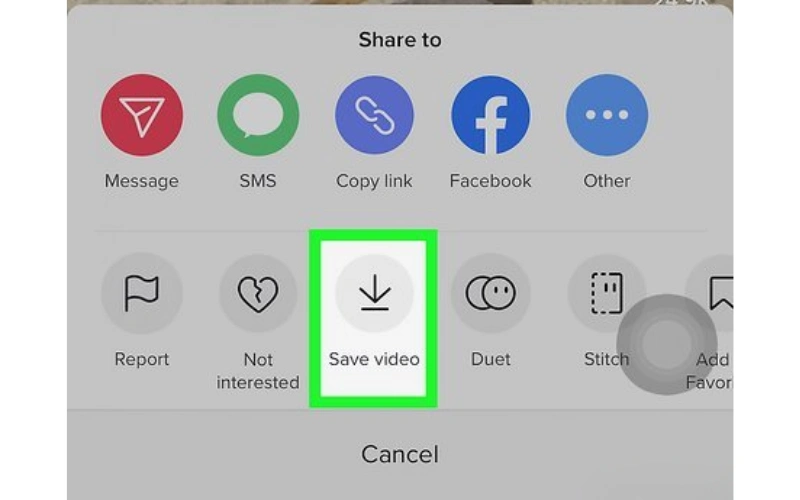
TikTok offers a convenient feature that allows users to save videos they enjoy for later viewing. This can be particularly useful for revisiting favorite content or keeping track of videos you might want to share later. To save a video on TikTok, simply tap the Share icon on the video and select “Save Video”. The video will then be stored in your device’s gallery or the app’s saved section.
A common question among users is: “Does TikTok notify when you save someone’s video?” The answer is no—TikTok does not send notifications to creators when their videos are saved. Saving a video is a private action, and the original creator will not be alerted when someone saves their content.

It’s important to note that while saving videos is a private action, TikTok does allow creators to control whether others can download their videos. If a creator has disabled the download option for their videos, users will not see the “Save Video” option. In such cases, users may need to explore alternative methods, such as using third-party applications, to save the content.
How to Save Videos on TikTok
- Steps to save a TikTok video:
- Tap the share icon
- Select “Save Video”
- Video is saved to device with watermark
- Option availability depends on the creator’s settings

How to Protect My Videos from Being Saved
TikTok allows creators to control whether their videos can be downloaded by others, offering a way to protect content from being saved without permission. To disable downloads, navigate to Settings & Privacy > Privacy > Downloads, and toggle off the “Allow Download” option. This prevents other users from saving your videos directly through TikTok.
Many creators are concerned about privacy and often ask, does TikTok notify when you save someone’s video. When download is disabled, users cannot save the content at all, ensuring that your videos remain private. While disabling downloads enhances content protection, it may also impact user experience, as followers will not be able to save videos for offline viewing or personal reference.
How to Download TikTok Videos Without a Watermark?
If you want to save TikTok videos without the watermark, third-party apps like Clippy offer an efficient solution. Clippy is available for both iOS and Android, allowing users to download videos directly to their device without leaving any watermark on the content.
Step-by-Step guide using Clippy
- Step 1: Download and Install Clippy – Find Clippy in the App Store or Google Play Store and install it on your device.
- Step 2: Copy the TikTok Video Link – Open TikTok, locate the video you want to save, tap the Share icon, and select Copy Link.
- Step 3: Open Clippy App – Launch Clippy and paste the copied TikTok video link into the input field.
- Step 4: Choose Download Options – Select the option to download the video without a watermark.
- Step 5: Save the Video – Tap Download, and the video will be stored directly in your device’s gallery.

Many users wonder about privacy and often ask, does TikTok notify when you save someone’s video. Using Clippy to download videos bypasses the watermark, and just like standard saves within TikTok, creators are not notified when their content is downloaded through the app. This ensures that your activity remains private while allowing you to save and enjoy videos offline.
Conclusion
In summary, TikTok does not notify creators when their videos are saved, providing users with privacy when downloading content. However, creators who wish to protect their videos can manage download permissions through Settings & Privacy > Privacy > Downloads and toggle off “Allow Download”. By doing so, content remains secure while still allowing creators to share selectively. This addresses the common concern: does TikTok notify when you save someone’s video.
